Vibe Coder · Unit 14: Deploy on Vercel · Lesson 7 of 8
Analytics with PostHog
Once the product is live you need to see what people do in it. Install PostHog, name the events that match your success measure, and read a funnel and a session replay.
Read the short notes and pictures.Do everything inside a blue frame.
From launched to learning
In the product unit you chose one success measure. A live product is the first chance to see it. Analytics is how: a record of what people do, so that decisions rest on what happened and not on what you hope happened.
What PostHog gives you
Product analytics
Events, trends and funnels.
Session replay
Recordings of real visits, so you can see where someone got stuck.
Feature flags
Turn a feature on for some people and not others.
Surveys
Ask a question inside the product.
Error capture
See errors users hit.
Installing it
The quick way
npx @posthog/wizard
What it sets up
posthog.init('<ph_project_token>', {
  api_host: 'https://us.i.posthog.com',
  defaults: '2026-08-30',
})Events
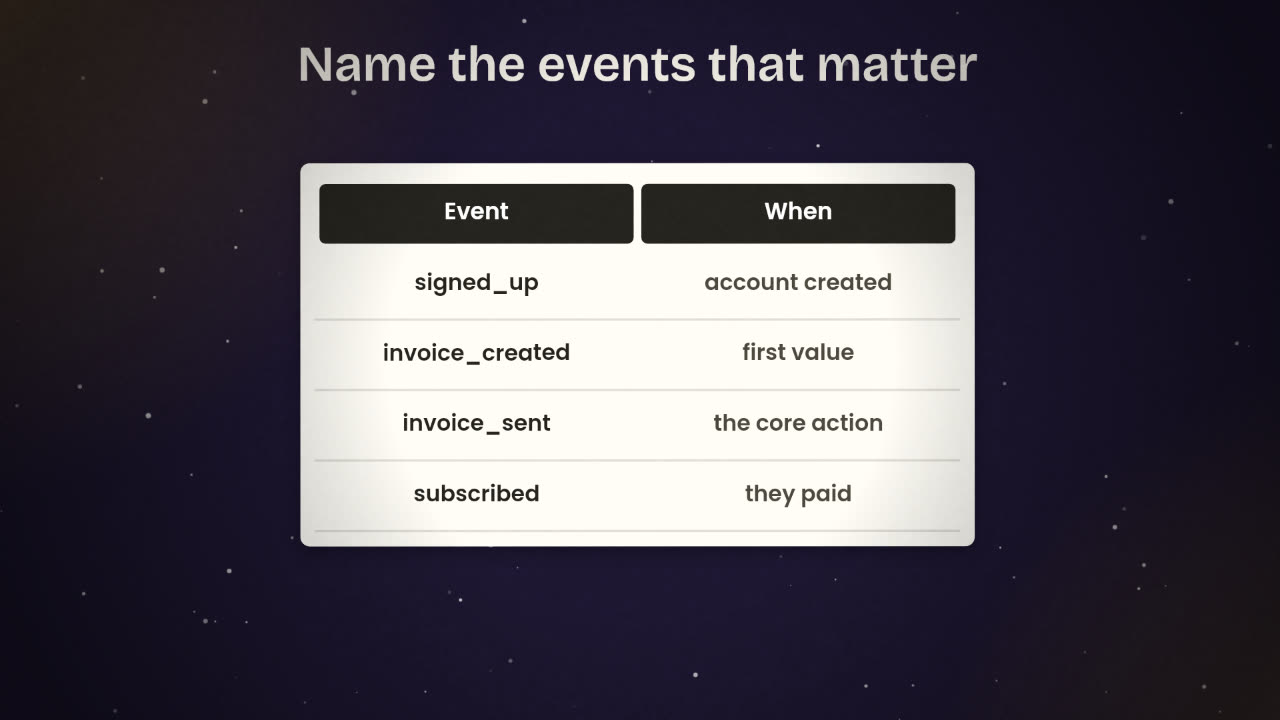
An event is one thing a person did, with a name and a time. Page views are collected automatically. The valuable events are the ones you name, and the art is to name few. Start from your success measure and work backwards through the steps that lead to it.
Too many
button_clicked
modal_opened
modal_closed
page_scrolled
hovered_logo
... (60 more)
Enough
posthog.capture('signed_up')
posthog.capture('invoice_created')
posthog.capture('invoice_sent',
  { amount_band: '1000-5000' })
posthog.capture('subscribed',
{ plan: 'studio' })Funnels
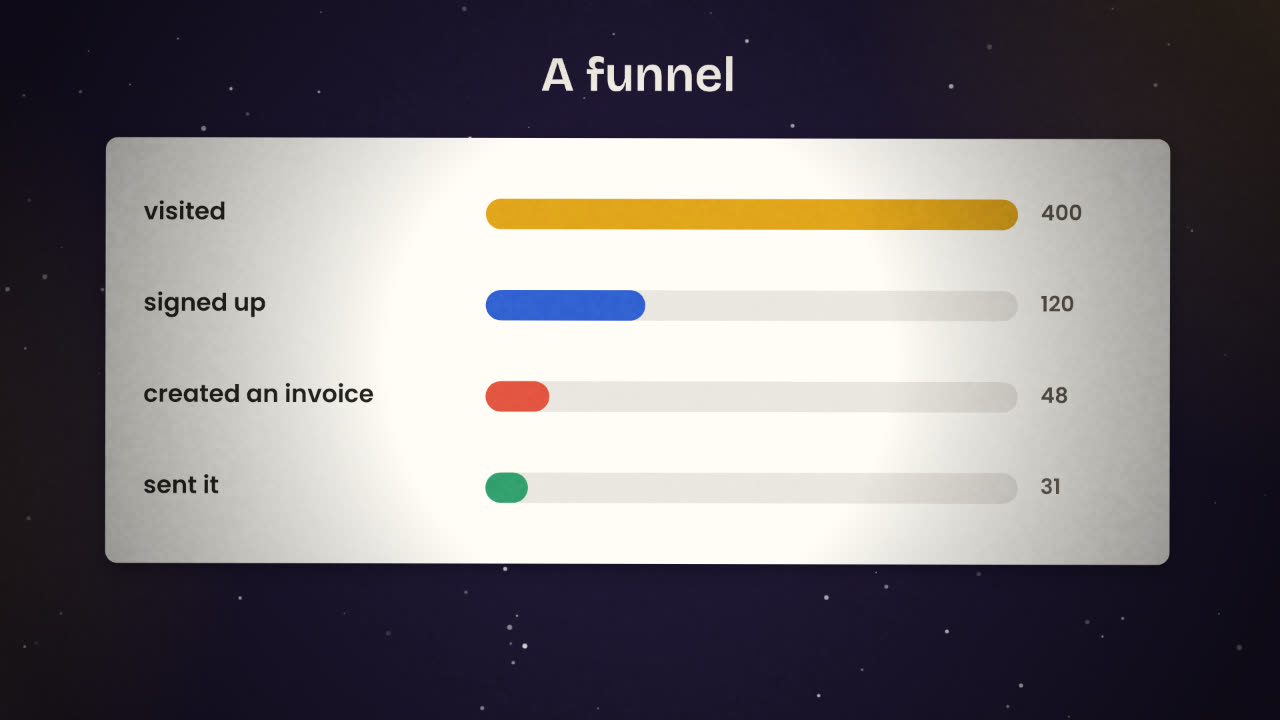
A funnel is your events in order, with a count at each step. The biggest drop tells you where to work. In the picture, seven in ten visitors do not sign up, and six in ten who sign up never create an invoice. The second number is the one to fix first: those people already wanted the product.
Build one funnel
From landing to your success event.
Find the biggest drop
Between two steps.
Watch five replays of people who dropped there
You will usually see the reason within minutes.
Change one thing
And compare the next week with the last.
Your funnel: 500 visited, 150 signed up, 30 created an invoice, 25 sent it. Where do you work first, and what do you look at?
Measure your live product
Add PostHog to your deployed app. Name the three or four events that lead to your success measure, build one funnel, and turn on session replay with sensitive fields masked. Update your privacy note.
Done when
Look at the funnel once a week. It decides what you build next.
Keep these
- Name the few events that lead to your success measure.
- A funnel shows the step that loses the most people.
- Watch replays of that step, change one thing, and compare.